I have long felt that the most valuable feature of Citation Machine is its simplicity and resulting ease of use. I believe that it still requires too much scanning and reading to make the selections for a specific source, so I am trying to increase the tool's simplicity by including some Cookie features that will cause your computer to remember certain things about how you use CM.
If this all works (I'm doing the programming at this typing), then when you select a style (MLA, APA, Chicago), CM will remember that selection so that the next time you open the tool, it will automatically click out that style.
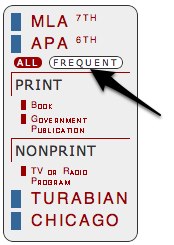
In addition, I am rewording the expanding button from Fewer and More to Frequent and All. CM will now record on your computer (via Cookies) the content sources that you use, and then list only those when you select FREQUENT. Clicking ALL will return all sources.
With some uninterrupted days at home, I have been tinkering a bit with Citation Machine. I've been intrigued with the feature of many apps and browser extensions where you simply click a button and the desired text is automatically copied into your computer's clipboard, ready to be pasted where needed. URL shorteners have been especially benefitted by these features.
Figure 1
Figure 2
So I started researching the code that enables this, and found that what typically works with Firefox, Safari, Opera, etc. will not work with Internet Explorer (IE), and what works with IE is ignored by the other browsers. So I also had to research the code that enables Citation Machine to detect the type of browser that is being used, so that the proper code can be included for the click to copy function.
It seems to be working now and I have installed it on all of the MLA and APA formats. There is some programming that I have not yet done for Turabian and Chicago that would be necessary to include C2C functions. It works like this:
You select your style (MLA) and the type of media you are citing (book).
Enter the proper information, for the instance to the right, I'm entering the info for my latest book, "A Gardener's Approach to Learning."
Click the [Submit] button to receive the return in figure 1.
A yellow [Click to Copy] button appears in yellow. When you move the cursor over the button it turns to orange and then flashes red when you click it.
You can then paste the contents of your clipboard into your word processor, text processor, blog editor, or what ever. What is left are the bibliographic citation (for bibliography or works cited section), instructions for what to italicize (since such formatting is not carried over in the clipboard, and the in-text parenthetical citation for inclusion in your actual paper or blog entry.
You have to continue to do some editing after you paste the citations, deleting out the titles and italicizing sections indicated by the instructions, but I suppose that you are in more of an edit mode of thought and action when you are in your editor or word processor than you are when using your web browser.
If you have comments or suggestions, place leave a comment on this blog entry.
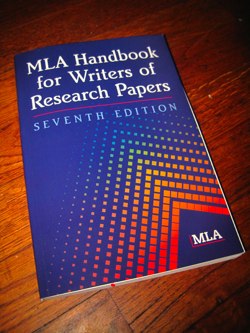
I finally went out and bought the book -- MLA Handbook for Writers of Research Papers: Seventh Edition. I've completely redone all of the citation templates and you may notice some minor changes in the format of the page, but nothing major. Hopefully, you will notice some performance increase, though the map may be slowing things down. I may remove that. It's just cool to see who's hitting this thing.
Now somebody is calling for the AMA format. I hadn't even heard of that one. But I may just add it in.
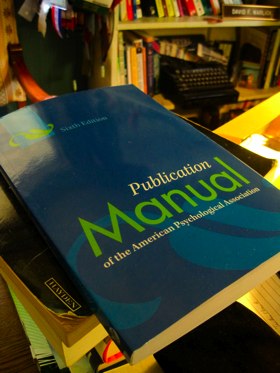
I have almost three weeks off from traveling, and I have spent the first part of that, the afternoons, updating APA to the Sixth Edition Publication Manual of the American Psychological Association (APA). I also took the opportunity to rewrite a lot of the code that generates the APA citations so that the tool will run much faster (theoretically).
I know that there will be questions. There have already been questions:
..for example why was the Web Pages heading dropped from the APA format???
I had to make a number of calls and dropped a couple of sources because I simply wasn't comfortable adapting citations the way that I have in the past. Dropping Web Pages was a tough call. But there simply was not a citation format described in the manual for "web pages."
Most of the non-print sources, however, do include textboxes for web URLs as well as Digital Object IDs (DOIs). So you can cite books, journal and magazine articles, online encyclopedia articles, weblogs, podcasts, online forums, and online conference proceedings as web pages. The impression that I got from the manual was that APA wants references to be established and easily verifiable resources.
If there are other sources that are missing here, please just comment on this blog entry. I will receive an e-mail notification and get to it as soon as possible.
Next step -- go through and double check (and recode) MLA to 7th edition.
Last summer, The Modern Language Association released it 3rd edition of the MLA style guide. It takes affect this month (April 2009). There are two major changes with regard to citations.
Web URL are no longer included in standard Citations. I have programmed them out of Citation Machine. If there is a reason to include them in your MLA submission, simply add the URL, enclosed with angle brackets , at the end of the citation and close with a period.
Title are no longer underlined in the citations. Instead, they are italicized. This change, also, is included in Citation Machine.
You've likely noticed some happening with Citation Machine. If it has caused you any convenience or grief, please accept my apologies.
My main concern has been that efficient performance. With the end of the semester approaching and now here, the usage of CM nearly doubles, and I know that slow loads can be very frustrating.
So, a couple of months ago, I tried utilizing iframes in the code, something I hadn't done before -- and it worked quite nicely. When you click [MLA], and the list of content sources appears, that is the only information that is reloaded. Before, the entire page had to be reloaded. When you clicked a source to be sited, and the web form appeared asking for info on the source, then that form is the only thing that is loaded.
Version 4.0 was born.
The problem that emerged was that although my Windows computer (a Mac Intel machine) ran the new tool just fine, many people wrote in indicating that these new features were not loading at all -- rendering Citation Machine useless.
I write in some workarounds, that would recognize Windows machines, redirecting them to non-iframe versions of the Citation Machine, which meant that I was maintaining multiple versions of the tool. The workarounds thickened the programming and caused more problems, nececitating more workarounds and more coding. It finally got to tedious to work with.
So I got up early yesterday morning and started a complete re-write of Citation Machine, using Cascading Style Sheets, something I'm doing more of -- finally. Pulling in working modules from the earlier versions, I seem to have finished it after another early morning codathon (3:00am to 7:50am).
Version 5.0 seeks to solve both the problems of slow loading and complexity of the code. To address both of these problems, Citation Machine will now offer either the menu of citation styles and sources, or the web form or completed citation -- rather than loading both the menu and the forms with each mouse click. The significantly simplifies the code and page loads should be nearly as fast as with the iframes.
Please let me know if the new version causes any problems.
Many of the follower of my 2¢ Worth blog, already know that we've added a second web server to the Landmarks setup. I guess we have a sever farm now, though it's really more of a server backyard garden. But even at that, Citation Machine was stressed off and on through the end of the fall semester.
So, over the past few weeks of not traveling, I've been working on some new programming for CM that breaks it loose from the databases. Now, all of the coding is resident within the program itself and various config files. What this means is that it should run faster.
I have also added a new feature that is more of a beta offering, because I do not know how much it will stress the system. But for years, people have asked about the ability to have CM remember their citations for the sake of later bibliographies. Now you can do that, and here's how:
Click [Register] in the top menu to register for a CM account
If you have already registered, you can use this page to login. If not, type your name and e-mail address, make up a username and password, and select your location.
Click [submit].
Go through the process of generating a citation. When completed, you will see a [Save this Citation] button at the bottom of the page. Click this.
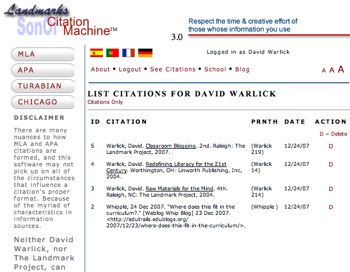
To view your citations, click [See Citations] at the top menu.
From here you can get a listing of the citations with dates generated, or click [Citations Only] to view a copiable version.
I use Citation Machine all the time, mostly to cite images and other sources for my blog. A problem that has pestered me over the months is that the CM window is so large. I'm constantly having to move it around on the screen so that I can find the information on the web page that I need for the citation.
So to solve the problem, I've installed a new button in the top menu, [Shrink]. This button will remove the top banner and the left menu (assuming that you've already chosen your citation style, and reduce the size of the window so that it doesn't cover up as much of the digital document you are citing. Google Ads remain. I have to pay for my children's college somehow.
An additional link will appear, [enlarge], that will pop the window back out to size with the banner and the main menus.
My apologies for Citation Machine being down over the last couple of days. I have moved the pages over to my new dedicated server, and there was a glitch in moving the domain name. Dreamhost released it, but there was a problem in my configuration that prevented Rackspace from catching it. Cleared up now, over a phone call from my breakfast table in Asheville yesterday. I love phone support.
There's obviously a lull in citation machine usage right now and I'll be spending part of this time featuring Son of Citation Machine out. I think you'll be pleased.
I have been reading all of the suggestions. Many have been kind and constructive suggestions, and others expressions of frustration with Son of Citation Machine. I understand completely. People use Citation Machine to alleviate the frustration of navigating complex style manuals, and to have to figure out how to navigate a new CM... -- well I understand.
I also understand the frustration among educators about the presence of paper mills in the Google Ads. Brenda has been blocking those companies as we run across them, and the list is surprisingly long. I wrote about this (It Doesn’t Solve the Problem) in 2¢ Worth the other day, and I suggest your reading.
We have also been working on another strategy to diversify the Google Ads. I have installed three RSS aggregators in SOCM 2.1, that will display news feeds from three sources:
BBC World News
Internet Movie Database (IMDB) Studio News (movie reviews)
iTunes top selling songs
Again, I know that folks do not come to citation Machine for casual reading. But the main purpose of the feeds is to provide more varied content for the Google Adsense spiders to find and to issue more varied ads on the site. Our test site already indicates much more diversity in the ads.
It seems that citation machine has settled for the time being. I have written an ad hoc load sharing program that sends everyother person to two citation machine sites. That said, we are now looking for a dedicated server. Going through this each semester, and putting you through this each semester is not fair to any of us. Plus, I have other web tools that need better performance. So we're listening to sales pitches now, and will likely be selecting a service in the next couple of days.
Also, I have continued to add some multiple author templates, mostly in the APA format. I'll catch up with the APA format later today and tomorrow.
Many of you have constructively suggested that I make it easier to cite resources with multiple authors. I figured out a way about 3:00 yesterday morning, got up, and added a feature that provides, for MLA folks, templates for 1, 2, 3, 4, & 5 authors. For the time being, this is only available for books. This morning, I got up at 4:00 and added templates for 1, 2, 3, & 4 authors in APA.
I'm on the road this week, speaking at conferences across four states. So early in the morning, is the only time I have to work on this.
Please stay tuned for more happenings with Citation Machine.
First, I want to welcome you to Son of Citation Machine (SOCM). It's been exciting to finally get this baby out, and, as is often the case, it's birth has been rocky. At the same time, it happened at exactly the right time. It's the end of the semester, and Citation Machine is serving more than a half-million page views a day.
So what's different about SOCM that helps with all this traffic. Mostly the software is much simpler. I reprogrammed most of the site so that the information involved in a citation comes from a database, so that Citation Machine just simply gets the format, plugs in the information, and then displays it for you to copy and paste.
Even with these economizing efforts, Citation Machine is threatening to bring down many of the other sites served by my hosting company. So I have been further economizing, at the same time that the technical folks at Dreamhost (my hosting company) have also enacted (heroic) measures to keep the service going.
I'm going to close now, by saying that I appreciate all of your suggestions. You have given me new ideas for further enhancing SOCM. More about that later.